大家都明白论坛附件都是放在 data/attachment/ 目录下面,为了将来能够远程和本地随时转换,这个目录一定要注意。
下面我们假设你的网站已经运行了一段时间,要把本地附件远程化,将来还要能够随时本地化。操作如下
1、第一步:在远程服务器上建立一个附件目录比如htdocs,并绑定一个你的远程附件访问域名,比如http://www.o6w.com
2、第二步:在远程服务器上设置好FTP,FTP的根目录指向htdocs,记录好FTP的IP、用户名和密码
3、第三步:关键一步,在远程的目录下建立与本地附件目录一致的子目录。也就是在htdocs下面建立data文件夹,再在data下面建立attachment文件夹,
把你的本地附件(data/attachment下所有文件)全部拷贝到这个附件文件夹来吧!文件尽量打包再传送。如下图
150712w589gwz86oxhm3o6.webp
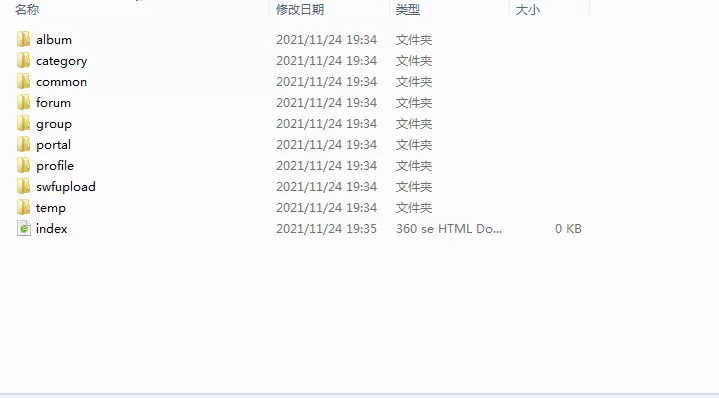
discuz 附件迁移:本地附件迁移教程,远程本地附件随时转换,
4、第四步:打开你的网站后台,进入“全局--上传设置---远程附件”设置好你的远程附件参数,远程附件的绝对地址填入 .data/attachment 注意前面有一个点,结尾不要/号。
远程访问地址则填写成 http://你的域名/data/attachment 结尾不要/号,现在,你的本地附件已经远程化了,赶紧发个贴测试一下吧!
150711capni9aauok00ok8.webp
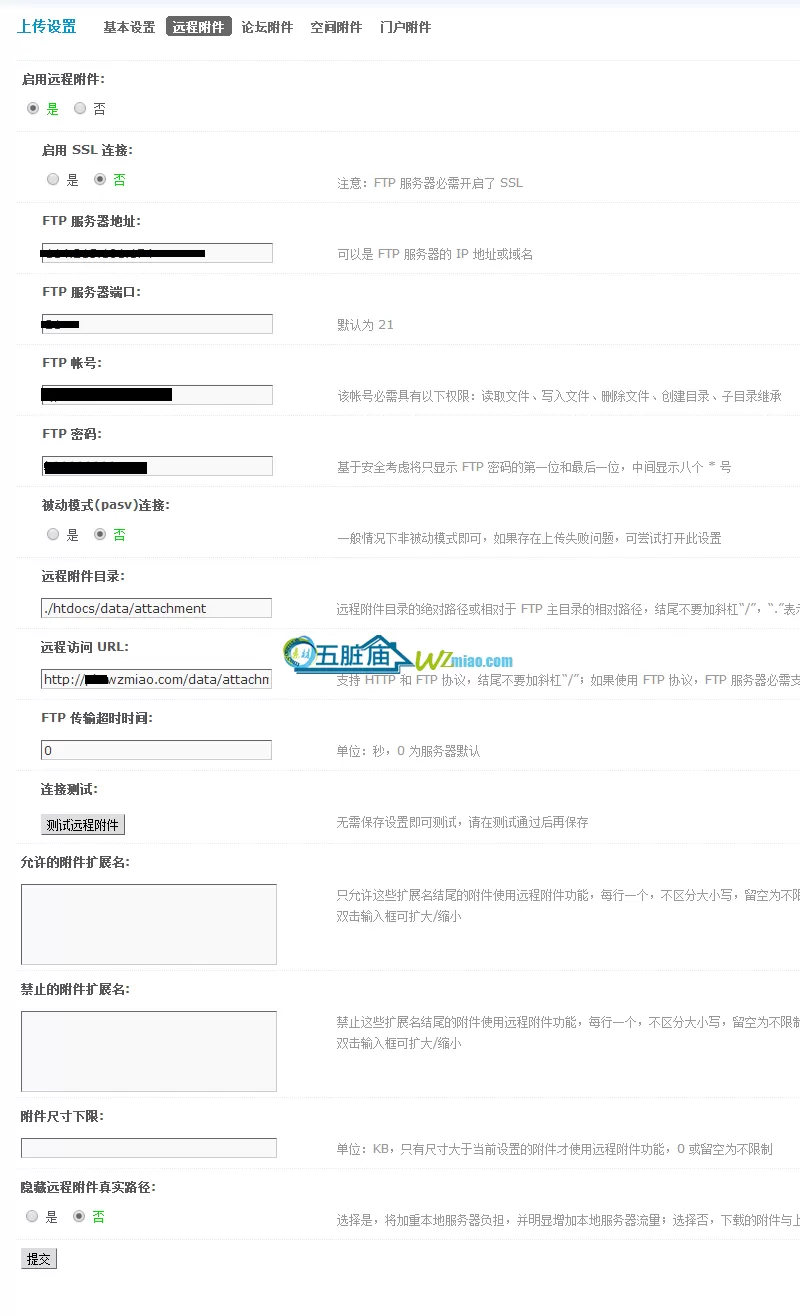
discuz 附件迁移:本地附件迁移教程,远程本地附件随时转换,
第五步:可是原来的老帖子,图片还是显示本地的,怎么办呢?
最后一步,告诉你如何把老帖子的本地路径改远程。打开后台的“全局--上传设置---基本设置”,把本地附件的URL改一下,
改成http://你的远程域名/data/attachment ,更新缓存,大功告成!
150711k2i2ek3et035zvq6.webp

discuz 附件迁移:本地附件迁移教程,远程本地附件随时转换,
将来远程附件要迁移到本地化怎么办?
本地转远程
- update pre_forum_attachment_0 set remote = '1' ;
- update pre_forum_attachment_1 set remote = '1' ;
- update pre_forum_attachment_2 set remote = '1' ;
- update pre_forum_attachment_3 set remote = '1' ;
- update pre_forum_attachment_4 set remote = '1' ;
- update pre_forum_attachment_5 set remote = '1' ;
- update pre_forum_attachment_6 set remote = '1' ;
- update pre_forum_attachment_7 set remote = '1' ;
- update pre_forum_attachment_8 set remote = '1' ;
- update pre_forum_attachment_9 set remote = '1' ;
远程转本地
- update pre_forum_attachment_0 set remote = '0' ;
- update pre_forum_attachment_1 set remote = '0' ;
- update pre_forum_attachment_2 set remote = '0' ;
- update pre_forum_attachment_3 set remote = '0' ;
- update pre_forum_attachment_4 set remote = '0' ;
- update pre_forum_attachment_5 set remote = '0' ;
- update pre_forum_attachment_6 set remote = '0' ;
- update pre_forum_attachment_7 set remote = '0' ;
- update pre_forum_attachment_8 set remote = '0' ;
- update pre_forum_attachment_9 set remote = '0' ;
1、把远程对应的data/attachment 文件夹下文件拷贝到本地论坛覆盖
2、关闭远程附件服务
3、在基本设置里边本地附件URL地址,去掉远程域名部分
4、更新缓存,大功告成! | 

 发表于 2024-11-22 10:34:54